
Subcategories
- Details
- Category: Pages
- Read Time: 1 min
- Hits: 880
The ITC offers online technical support to the faculty, students, and staff of Ateneo de Manila JHS that need assistance with the basic troubleshooting of equipment, accessing photos and videos online as well as in-house photo and video documentation, setting up and facilitating the live streaming of school activities via Google Meet or Youtube, and providing technical consultation and advice.
In this online distance learning setup, we use other means of communication to respond to inquiries. Typically, this is done via Google Chat or through e-mail to provide the best service to the clientele. OBF and Ateneo accounts are needed in accessing these services. You may send your inquiries from Monday-Friday 8:00 AM to 5:00 PM at

- Details
- Category: Pages
- Read Time: 1 min
- Hits: 962
The EMC personnel provides assistance to faculty, students, and staff of Ateneo de Manila JHS in using the Library and the ITC, locating materials, using OPAC and online databases, and using basic reference sources. Librarians also provides assistance in identifying library materials needed to answer research queries. Orientations and modules to effectively use resources were also provide as reference and guide to the community.
Together with the IT Office, the EMC also assists the students in securing accounts to access all online materials provided by the Center. Online technical assistance such as streaming of school events, technical advice, and documentations are also being provided.
During online distance learning set-up, stakeholders can send email to
- Details
- Category: Pages
- Read Time: 1 min
List of Available Open-Access Databases
The EMC listed down open access databases from which one can download full-text articles for research:
- Details
- Category: Pages
- Read Time: 12 mins
- Hits: 1364
On the Use of Audiovisual Materials
- AV materials (i.e. kits, models and are circulated to the faculty and staff on a one-week basis but they may be renewed or recalled as the need arises. Borrowers should bring the materials to the ITC for renewal. for instruction are for school use only and cannot be brought home. On the other hand, for recreation, and compact discs are for overnight use and borrowers should not have more than two (2) AV MATERIALS, in their possession at any one time.
- Borrowers should present their ID for scanning into the computerized circulation system and wait for the staff to properly input the transaction into the computer.
- Borrowers will be responsible for all the materials they sign out. Lost or completely damaged materials will have to be replaced or paid for at the current cost.
Note:
- Some AV materials can be lent out to students for instructional purposes to be used in the classroom.
- Selected instructional can be brought home for previewing by faculty on a case to case basis.
On Borrowing from the Video Library
- A faculty or staff can borrow one (1) video tape/disc on a weekday but must be returned the following day.
Note: This privilege is open only to AHS faculty and staff and is NOT extended to outsiders. Casual employees may borrow thru a staff member (e.g. Textbook Office c/o the supervisor) while parents may borrow thru the PUSH Office.
- For weekend borrowing, one is allowed to borrow two (2) video discs on Friday afternoon to be returned the following Monday.
- An overdue fine of P5.00 per day will be charged for each /disc borrowed.
- Only duplicate copies, either VHS or Beta format, can be borrowed. Original copies will be kept on file for security reasons and for availability in the display area.
On the Use of Equipment
- Certain equipment are being lent out for use in class but they have to be returned right after the period/s they are used. Whoever borrowed the equipment is responsible for returning it to the ITC. Failure to do so would mean a daily overdue fine of P 5.00.
- When borrowing or returning AV equipment, borrowers should present their IDs for scanning into the computerized circulation system and wait for the staff to properly input the transaction into the computer.
- Borrowers should inspect the equipment lent out to them. Any malfunction should be reported immediately to the Center.
- Equipment should be handled with care. In case of accidents resulting from negligence, the borrower should pay for the total cost of repair or replacement of the equipment damaged.
- In case of loss, the borrower will be asked to replace the equipment with the same brand and model or pay for it in cash at the current cost.
On Request for Photo/Video Documentation
- The ITC will keep the original copy of photo/video documentations taken by its staff but the subject area may be able to access, request, or borrow a copy for instructional purposes. In the same manner, the ITC may be given edited copies of digital materials taken and/or produced by individual teachers and/or the subject area for maximum utilization and posterity.
On the Use of the Multi-Purpose Room (MPR)
- The MPR can be reserved for the following purposes:
- individual/small group viewing/pre-viewing; ()
- individual/small group listening;
- video recording and class editing of video production;
- audio recording – for background music, narration of radio plays and other productions;
- forum/symposium for supervisors or small group of faculty, staff and other members of the school community;
- The MPR is not available for year-level or departmental meetings because these might be in conflict with the above-mentioned activities.
- For dubbing, editing and recording requests, only those that are instructional (i.e. school or classroom related) in nature will be entertained by the ITC.
- For the use of any facilities at the MPR, a time limit of two periods (maximum) will be imposed to all users per request.
- Only final recording of projects and/or group productions will be accommodated. Rehearsals/practice sessions should be done outside.
- Requests should be accompanied by Form 5 ( Appendix B) and should be coursed through the Non-Print Librarian for the purpose of control and evaluation.
- If a teacher requires sound recording in the MPR, the schedule of recording of all groups/classes should be attached to the Service Request Form (ITC Form 5).
Note: A maximum of ten (5) persons can be accommodated the recording booth and three (3) persons in the control panel (including the ITC staff).
On the Use of Projection Rooms
- The Projection Rooms may be used on a “first-come, first-served” basis for the following purposes:
- class viewing of video recordings,
- meetings called by the Administration and/or those whose topics are confidential in nature
- activities with guest speakers initiated by teachers/students/parents in class for groups involving 40 or more (i.e. lectures, career talks, student orientations, debates, contests, symposia and panel discussions);
- school-sponsored activities that are non-income generating.
- computer-assisted instruction (only when the classroom equipment malfunctions)
- No student or faculty is allowed to use the rooms for any purpose without prior reservation and authorization.
- Faculty members should make their reservation in person by writing directly on the Daily Projection Schedule whereas and outside groups will have to fill up a service/reservation form at least two (2) weeks before the scheduled date of use.
- Early reservations may only be made within one month’s time to avoid cancellation and to give others a chance to do so.
- Class projection reservation will be automatically cancelled if the class will not come within the first fifteen minutes of their scheduled time. Students will not be allowed inside the rooms if no teacher is around.
- In case of conflict in schedule or non-availability of equipment or personnel, the ITC supervisor reserves the right to disapprove, transfer, cancel or postpone the delivery of such requests.
- Food and drinks are not allowed inside the projection rooms.
- The requesting party shall be responsible for the proper care, order and use of material/s, equipment and facilities while inside the room.
On the Use of Hayes Hall
- During class hours, the Hayes Hall can be reserved for one of the following purposes only:
- performances by class or student activity group/s
- inter-class academic activities (i.e. ‘Sabayang Pagbigkas’, radio play presentation, debates, symposia, fora)
- film viewing (only when the classroom equipment malfunctions)
- All equipment inside the is under the responsibility of the ITC. As such, the ITC will take care of their maintenance, repair and upkeep.
- Reservation procedures and guidelines on use should follow those of the projection rooms.
- Users should borrow the key from the ITC Circulation Counter and lock the door at the end of the period.
- Food and drinks are not allowed inside the hall nor at the technician’s booth.
- Use of water, candle, huge props and other hazardous materials during play presentation is discouraged. If it is really necessary, user should get a clearance from the EMC Coordinator.
- Touching and mounting anything on the cyclorama are strictly prohibited.
- Fire exits should not be used as entrance or exit by the audience or by the participants.
- A maximum of 5 persons, including the technician, are allowed in the Control Booth.
- The use of sound and special lighting equipment will be allowed only with the presence of an ITC technician and/or his assistant.
- The use of equipment other than what are found in the Hayes Hall (e.g. band equipment, additional sound system, generator, etc.) will be allowed only under certain conditions as the EMC Coordinator deems fit. As such, an additional amount (depending on the type) will be charged for the electricity.
- Equipment (e.g. air conditioners, lights, LCD projectors, desktop computers) should be turned off immediately after use.
- Students should be under the supervision of subject teacher.
- For practices/dress rehearsals, the following guidelines should be followed:
- Group and/or class practices/dry-runs/dress rehearsals for graded projects or presentations during class hours will be accommodated. The subject area will have to make a reservation in writing one month before giving the schedule of practices of each group/class. Service form will NOT be required.
- Only one period of practice will be allowed per group and/or class. However, on special circumstances, another period can be reserved by the subject teacher depending on the reason as well as on the availability of facilities and personnel.
- If there is a conflict in schedule:
- For non-calendared activities, the APAA will be the one to decide.
- Calendared activities will be given priority.
- In case of unforeseen circumstances, the ITC Supervisor reserves the right to transfer, cancel, or postpone the delivery of such requests. As such, teachers will be informed in advance.
On the Use of Multimedia Projector and Accessories in the Classrooms
- For other purposes beyond class hours, the moderator should secure a letter of request addressed to the EMC Coordinator for approval. Upon approval of the request, the class will be charged accordingly.The projectors, amplifiers, speakers and projector screens are primarily for instructional use only. However, they may also be used by the class beyond class hours for official class activities such as class presentation to parents and Guidance sessions during class nights. In such cases, the class Technical Assistant should fill-out the Service Request Form at the ITC, have it endorsed by the class moderator and submit it to the ITC for approval.
- The Class Technical Assistant (CTA) will be assigned to take charge of the equipment. He shall:
- keep the remote control to the projector;
- keep the key to the locker that contains the connector sockets and power switch to the projector and the amplifier. The locker must be opened only during the period that the projector will be used;
- turn off the projector and the amplifier and keep the projection screen rolled up when not in use;
- turn off the main power switch of the equipment at the end of the last academic period daily;
Note: Allow at least two minutes after the projector was turned off (or wait until the red light on the projector stops blinking) before turning off the main power switch of the equipment.
- report to the ITC any malfunction or problem encountered on the projector and its accessories.
- Attend the CTA Orientation at the beginning of the school year.
- Keep the pouch containing the remote control of the LCD projector, padlock/s, and keys to the panel box.
- Turn on the multimedia equipment upon the request of the teacher.
- Turn off the equipment when not in use (mandatory during recess, lunch and dismissal).
- Turn off the main power switch when not in use and during dismissal.
- Roll-up the projector screen when not in use.
- Report any malfunction immediately to the ITC (local 6203).
- Return the pouch containing the remote control of the LCD projector, padlock/s, and keys to the panel box at the end of the school year.
Note: In case of loss, padlocks, keys, and/or remote controls will have to be replaced with the same brand or paid at its current cost as soon as possible.
- Students should avoid playing with any object inside the classroom that would hit and damage the equipment.
- Students will be allowed to use the equipment in the classroom during breaks:
- for instructional purposes
- with the supervision of a subject teacher
- Disciplinary sanction will be imposed on any student who attempts to use the projector and other equipment improperly. In case the LCD projector or any of its accessories will be lost or damaged due to improper use or negligence, the student/s involved or the entire class will pay for its repair or replacement.
Note: In the absence of Class Technical Assistant, the subject teacher can send the beadle to the ITC to borrow the key to the locker.
On Borrowing of Laptop Computers
- The laptop computers are for instructional use only.
- Reservation for the use of the equipment shall be made at least one day before the intended date of use. They may be borrowed for a maximum of two (2) periods and shall be returned immediately after.
- Materials VHS format that will be used by teachers in the classroom can be requested for transfer to DVD format. Request should be received by the ITC three (3) days before the intended date of use.
- The class/subject teacher will be responsible for the laptop computer he/she borrowed. The equipment must be handled with care and any malfunction should be reported immediately to the ITC.
- In case of damages resulting from improper use or negligence, the borrower shall pay for the total cost of repair or replacement of the spare parts/equipment damaged.
- In case of loss, the borrower will be asked to replace the computer with the same brand and model or pay for it in cash at the current cost.
- Details
- Category: Pages
- Read Time: 3 mins
- Hits: 6152
The Instructional Technology Center (ITC) of the Ateneo High School functions as a vital instrument as well as a basic support facility for quality education which aims to supplement and enrich the educational process. The use of the Instructional Technology Center facilities by individuals and groups in the Ateneo de Manila High School community is highly encouraged. Materials and equipment have been organized, and guidelines and procedures are established to ensure the facility’s effective service to students and teachers.
The ITC is made up of two projection rooms which can accommodate a maximum of four classes at one time, a multi-purpose room which houses the recording booth, and a staff work area which serves as a storage area at the same time. The whole complex follows a flexible set-up, is air-conditioned, and has adjustable lighting. Furthermore, it has provisions for computer-assisted instruction making use of advanced computer software and hardware. All classrooms are also provided with an LCD projector and an audio system to enhance the teaching-learning process.
The ITC contains projection technologies as well as equipment for audio and video editing, recording, and photo/video documentation. Instructional materials in various formats are also part of the ITC resources, namely: video and audio recordings, kits, pictures, models, and flip charts.
With technological advancement in the form of sophisticated equipment and facilities, new materials and varied services are incorporated into the educational program through the ITC. Policies and procedures are periodically reviewed, modified, and updated in an effort to provide the best service to its clientele and safeguard the resources under its care.
The ITC Aims To:
To provide support to the effective delivery of the school program as it strives to meet the needs of the students, teachers, and other members of the community.
To provide users with materials, facilities, and services that are most appropriate and meaningful for their growth and development.
To assist teachers in the selection and use of all types of materials that will enrich and implement the curriculum.
To organize resources for easy access and dissemination.
To help students and teachers become skillful and discriminating users of non-print materials as well as equipment.
- Details
- Category: Pages
- Read Time: 2 mins
- Hits: 6654
“The library is central to the instructional program of a school. Its main purpose is to provide service to the faculty, students, and administration in accessing information, developing research strategies, and utilizing media. Programs are created to strengthen and improve instruction in the school by developing in students lifelong learning skills and a love for reading.”
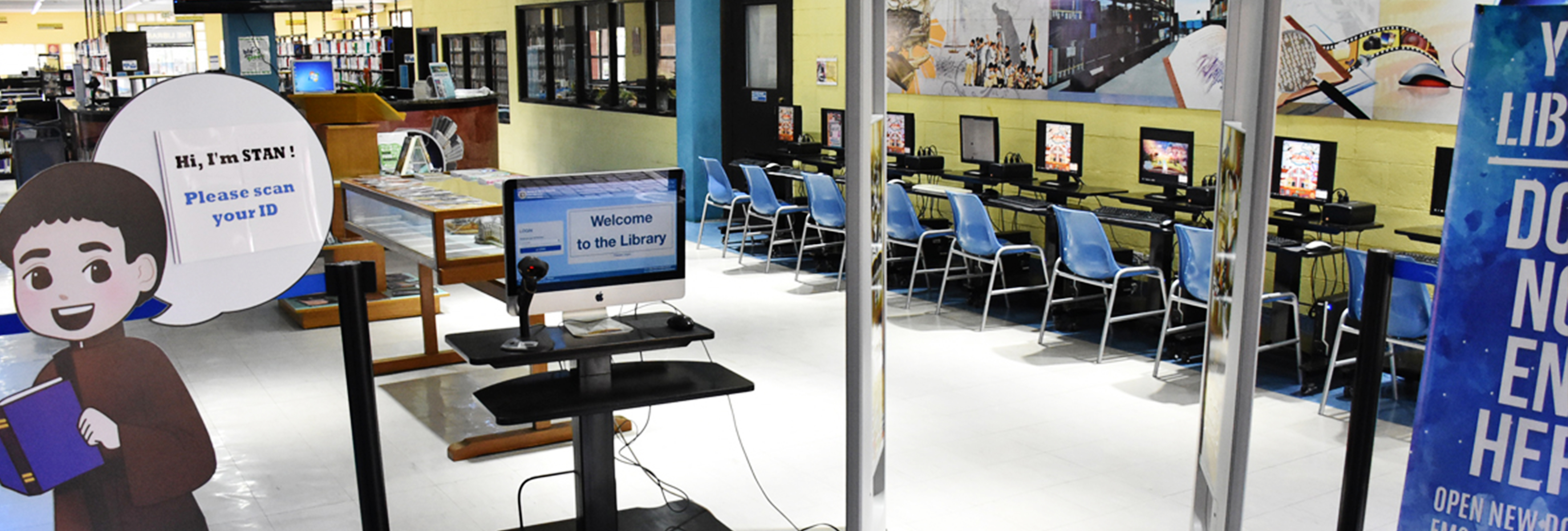
The ITC aims to:
To provide a wide and updated collection of print materials in all subject areas that are appropriate to faculty needs and suited to the interests and learning abilities of students.
To prepare, select, organize, and administer materials to ensure they are easily available and accessible to faculty, students, and administrators.
To assist faculty in the selection and effective use of various instructional materials to make the teaching-learning process more engaging and meaningful.
To encourage faculty and students to develop a love for learning by spending more time reading books, periodicals, and other print materials, and by maximizing the use of audio-visual and non-print resources.
To motivate, stimulate, and improve students’ reading habits so they may grow in critical judgment and appreciation.
To meet students’ research needs according to their level of maturity.